How to install Vantage Connect with Vantage Pro2 Weather Station

How to install Vantage Connect with Vantage Pro2 Weather Station

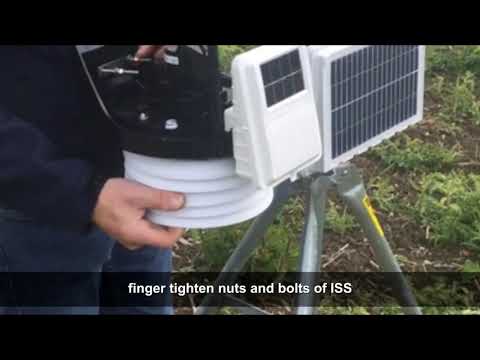
 This video is a guide on how to install Vantage Connect with Vantage Pro2.

Wind calibration on your EnviroMonitor Weather Station

Wind calibration on your EnviroMonitor Weather Station

Overview:

The anemometer at a Davis weather station should face north. If this isn't done or isn't possible, a correction can be made through WeatherLink.com. The procedures for doing so are explained below.

EnviroMonitor use instructions:

  • Go to WeatherLink.com and select the weather station that needs to be fixed.
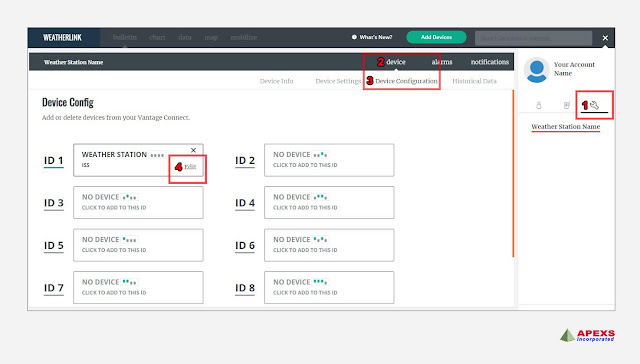
  • Then, from the "wrench" icon, select Device => Device Configuration.
  • Then click "edit" next to the highlighted ID #.
  • On the next page, select "advanced settings." (See the picture below for more details.)
  • Finally, enter the angle between the install direction and true North in degrees before clicking exit. 
EnviroMonitor Weatherlink Device Config: Wind calibration on your EnviroMonitor Weather Station
EnviroMonitor Weatherlink Advance Settings: Wind calibration on your EnviroMonitor Weather Station
EnviroMonitor Weatherlink Advance Settings for wind: Wind calibration on your EnviroMonitor Weather Station


Please contact us with any further questions.


Davis Vantage Pro2 and Vantage Vue Features and Testing to Weather any Storm

Davis Vantage Pro2 and Vantage Vue Features and Testing to Weather any Storm

Whether you are a weather enthusiast, a storm spotter, a Citizen Weather Observer, an amateur radio operator or just a weather enthusiast, Owning a weather station like this will show you so much of what the weather is doing at your location, and can be monitored remotely with an additional data logger and software. 


Check out above video to learn everything about Davis weather station, and you can join in on measuring your own backyard weather.

The Davis Vantage Pro2 and Vantage Vue Features and Testing to Weather any Storm.

Award winning and recognized